How to Minimize Downtime During Office Move in Ajax | Expert Guide
Every hour your office is not fully operational, your business loses money. Clients wait, projects stall, and revenue slows. For many business owners, this is the single greatest fear about relocating. The good news is that downtime is not an unavoidable cost of moving. With the right strategies, you can minimize disruption so dramatically that your clients may not even notice you have moved. This guide shows you exactly how to minimize downtime during office move in Ajax, keeping your team productive and your business running smoothly.
Why Downtime Is Your Biggest Moving Cost
When businesses calculate moving costs, they focus on the mover’s invoice. They forget the hidden cost that often exceeds everything else: lost productivity. Your marketing manager packing boxes instead of creating campaigns. Your sales team unable to access customer data. Your phones disconnected while clients call competitors.
These costs add up fast. A single day of downtime for a ten-person office can cost thousands in salaries alone, not to mention lost sales opportunities and client frustration. That is why learning how to minimize downtime during office move in Ajax is not just about convenience. It is about protecting your bottom line. Every strategy in this guide is designed to keep your business operating while your new space prepares to receive you .
Start with After-Hours and Weekend Moving
The Reality: The most effective way to eliminate downtime is to move when your team is not working. Professional office relocation without downtime Ajax businesses achieve almost always relies on after-hours scheduling.
Here is why this strategy works:
- Your team works Friday normally: No one loses a workday to packing or waiting for movers. Productivity continues uninterrupted.
- Movers work Friday night and Saturday: The entire move happens while your office is empty. Furniture, files, and equipment relocate without disrupting anyone.
- Your team arrives Monday to a functional office: Phones work, computers connect, and work resumes immediately. No downtime at all.
- Weekend rates are often comparable: Many professional office movers offer weekend scheduling at similar rates to weekdays. The value of saved productivity far outweighs any small premium.
The Bottom Line: When you ask how to minimize downtime during office move, this single decision—moving after hours—provides the most powerful answer. Your business never stops .
Technology Planning for Zero Disruption
Technology is the heartbeat of modern offices. If your phones, internet, and computers do not work immediately after the move, your team cannot work. This is where downtime happens most often.
Coordinate with IT providers early. Schedule internet and phone installation at your new location at least four to six weeks before move day. Confirm that services will be active and tested before your team arrives. Do not assume providers will meet deadlines without persistent follow-up.
Document everything before disconnecting. Photograph every computer setup—cable connections, monitor positions, peripheral arrangements. Label every cable at both ends with matching numbers. This turns reconnection from guesswork into assembly. Corporate moving without disruption Ajax companies know that labeled systems reconnect in hours, not days.
Prioritize server and critical equipment. These should move first and reconnect immediately. If your servers are down, nothing else matters. Work with your moving company to ensure IT equipment receives priority handling and placement .
Phased Move Strategies for Large Offices
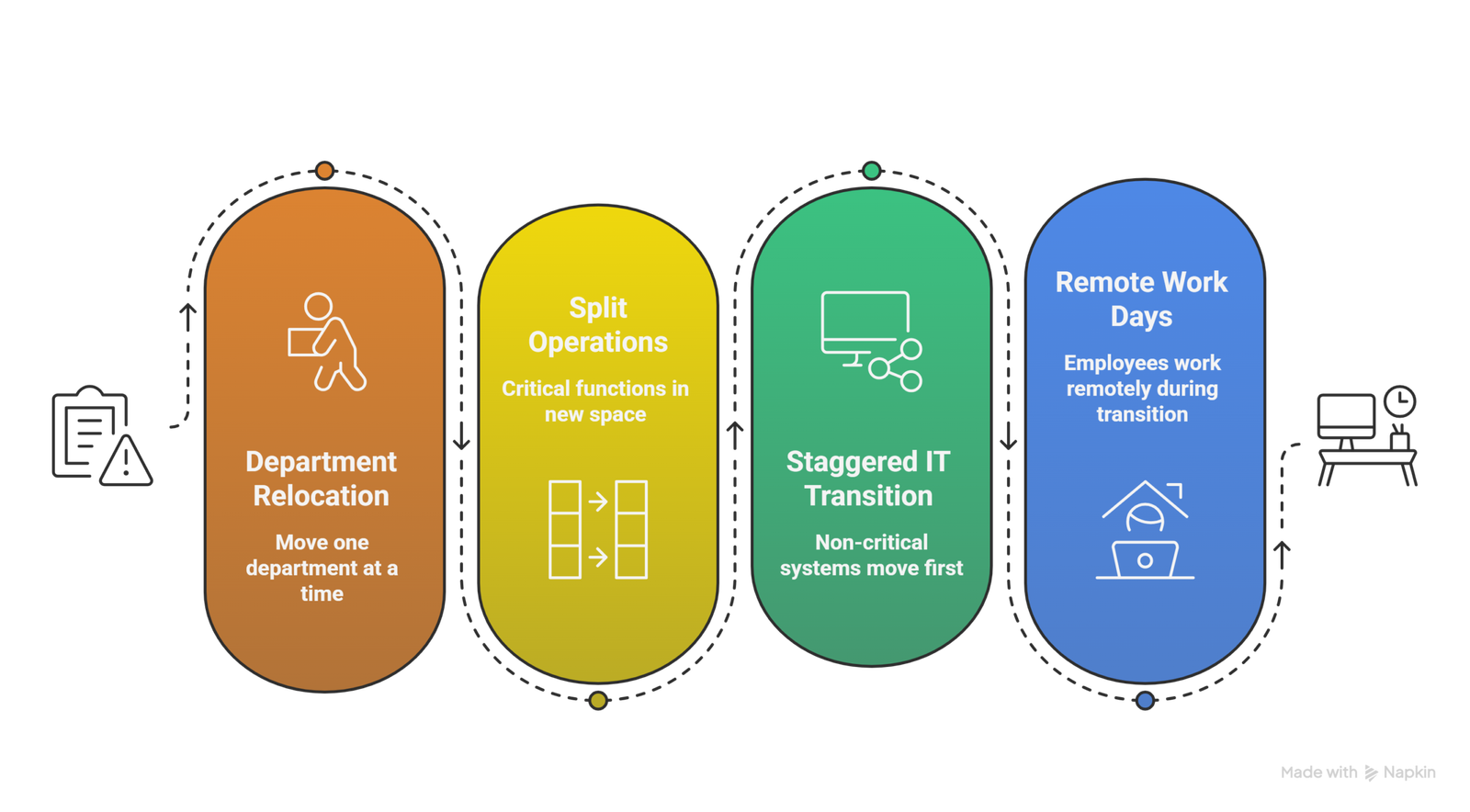
For larger offices, moving everything at once may not be practical. Phased moves allow business continuity during office move Ajax businesses with multiple departments can maintain operations throughout.
Consider these phased approaches:
- Department-by-department relocation: Move one department completely over a weekend while others work normally. The following weekend, move the next department. This requires careful coordination but keeps most of your team productive throughout.
- Split operations temporarily: If your new space is ready before your lease ends, set up critical functions in the new location while others remain in the old space. Sales and customer service move first. Back-office functions move later.
- Staggered IT transition: Move non-critical systems first. Keep servers and phones operational in the old location until the last possible moment. Coordinate a cutover during a weekend when impact is minimal.
- Remote work days: If a phased move is impossible, consider allowing employees to work remotely for one or two days during the final transition. This is far better than paying them to sit in an unconnected office.
The Key Insight: Office move planning for minimal downtime often means accepting that the move happens in stages. The goal is not zero disruption—it is managed disruption that does not affect clients or revenue .
Packing and Labeling Strategies That Save Time
How you pack directly affects how quickly you unpack and resume work. Smart packing saves hours on the back end.
Pack by department and function. Do not mix files from sales with files from accounting. Keep each team’s materials together so they can access what they need immediately. Color coding by department makes identification instant.
Create a “open first” kit. Pack one clearly marked box for each department containing everything needed for the first day—laptop, essential files, office supplies, power cords. These boxes stay accessible and unpack first.
Label for placement, not just identification. Every box should show not just what is inside but exactly where it goes. “Marketing Department – Conference Room – Presentation Materials” beats “Marketing Stuff” every time. Professional office movers tips Ajax always emphasize that detailed labeling is the secret to fast setup .
Communication Strategies That Prevent Delays
Your team cannot help minimize downtime if they do not know what is happening. Clear communication is essential.
Start with a master timeline. Share the full schedule with everyone involved—employees, department heads, IT, building management, and your moving company. Include key dates for packing, technology cutover, and move day itself.
Hold department briefings. Each team should understand exactly what they need to do to prepare and what will happen to their workspace. Answer questions early so confusion does not cause last-minute delays.
Designate a move-day coordinator. One person should have final authority to make decisions and direct movers. This prevents conflicting instructions and keeps the process moving. Everyone else should focus on their regular work.
Create a communication chain. Establish how updates will be shared during move day. Quick text updates to department heads keep everyone informed without constant interruptions .
Why Ajax Movers Prioritizes Your Business Continuity
At Ajax Movers, we understand that your business cannot afford to stop. For over 15 years, we have helped Ajax companies relocate with minimal downtime through careful planning, after-hour scheduling, and efficient execution. Our crews are trained to move fast without sacrificing care, and our processes prioritize getting your critical systems operational first.
When you choose us, you are not just hiring movers. You are partnering with a team that treats your business continuity as seriously as you do.
👉 Get Your Free Office Moving Quote from Ajax Movers
Ready to plan an office move that keeps your business running? Contact us today and let’s build your zero-downtime strategy together.
Top 5 FAQs About Minimizing Downtime in Ajax
Can we really move our entire office over a weekend?
Yes, for most small to medium offices. Professional movers can complete surprising amounts of work in a weekend with proper planning. Your moving company will assess your inventory and provide a realistic timeline.
What if our new space isn’t ready before our lease ends?
Short-term storage is the answer. Your mover can hold your furniture and equipment securely until your new space is ready, then deliver and set up when you need it. This prevents moving twice.
How do we handle phones and internet during the transition?
Coordinate with your providers to transfer services at the last possible moment. Many businesses maintain both connections for a short overlap period to ensure seamless transition. This small investment prevents major disruption.
Will employees need to work during the move?
With after-hours moving, no. They work normally Friday and return to a ready office Monday. If daytime moves are necessary, rotate which departments work remotely while their area is packed or unpacked.
What is the single most important thing to minimize downtime?
Communication. Ensure everyone—employees, movers, IT providers, building management—knows the timeline and their role. Surprises cause delays. A coordinated team executes smoothly .