How to Pack Computers for Moving in Ajax Step-by-Step Office IT Relocation Guide
Let me ask you something. When was the last time your office ran without its computers for even an hour? Probably never. Because in today’s business world, your computers aren’t just equipment—they’re your team’s ability to serve clients, process payments, and keep operations moving.
I’ve spent over 15 years helping Ajax businesses relocate, and if there’s one thing I’ve learned, it’s this: how you pack computers for moving can make or break your first week in a new office. One loose graphics card rattling across Ajax during transport. One hard drive bumped the wrong way. One unlabeled cable spaghetti nightmare on move-in day. Any of these can turn a fresh start into a frustrating scramble.
This guide walks you through exactly how to pack computers for moving in Ajax—whether you’re a small business relocating down the street or a growing company expanding to a new building. We’ll cover desktops, laptops, servers, and all the IT equipment that keeps your business alive.
And if the whole process feels overwhelming? That’s what we’re here for. Ajax Movers handles office IT relocation every week, so your team can focus on running your business while we focus on moving it safely .
Before You Touch a Single Cable: Pre-Move Preparation
Back Everything Up (Twice)
Here’s the golden rule of office IT relocation Ajax businesses swear by: assume nothing is fail-proof. Before you disconnect anything, back up all critical data.
- Use cloud backups for essential files
- Create external hard drive backups for each department
- Document which computer holds what data
- Test that backups actually work (you’d be surprised how many skip this)
Why? Because even with the best computer moving tips Ajax professionals follow, accidents happen. A backup means “accident” stays an inconvenience, not a catastrophe .
Take the “Before” Photos
Before unplugging a single cable, photograph every computer setup. Take wide shots of desk arrangements. Take close-ups of cable connections behind towers. These photos become your reassembly roadmap later.
Create Your Cable Labeling System
This single step saves hours on move-in day. Here’s the system that works for professional computer movers Ajax teams use:
- Color-coded labels: Match colors to device types (blue for monitors, yellow for printers, etc.)
- Numbered pairs: Label both ends of each cable with matching numbers
- Department grouping: Use different label shapes for different departments
- Photo documentation: Keep a digital folder of all labeled setups
Trust me—your future self on move-in day will thank you .
How to Pack Desktop Computers for Moving
Step 1: Proper Shutdown and Cooldown
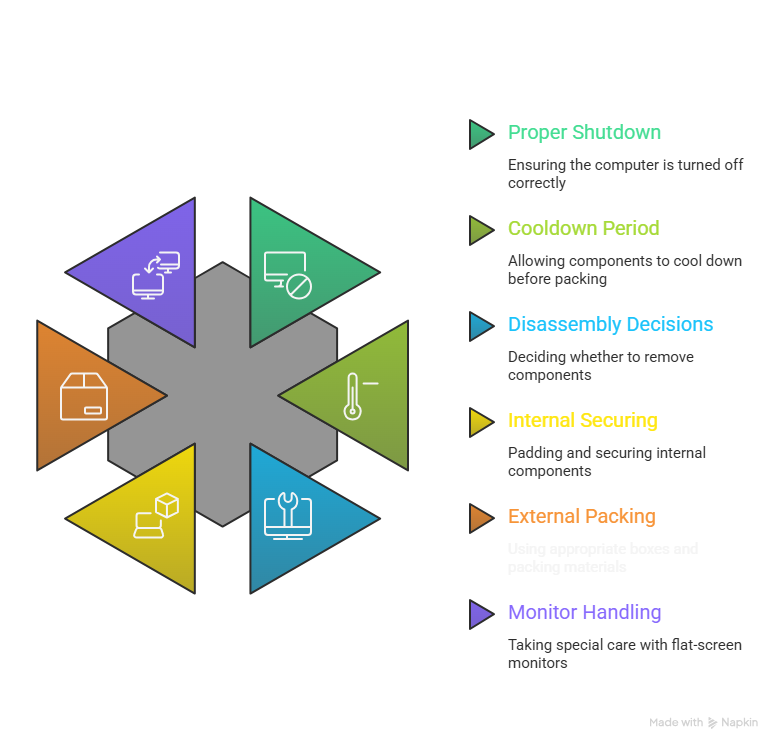
Packing desktop computers Ajax businesses move requires patience. Shut down properly through the operating system—never just kill power. Then wait. Give components at least 10-15 minutes to cool completely. Packing warm electronics traps heat and can cause condensation damage later .
Step 2: Decide: Disassemble or Not?
Here’s where opinions differ. Some say leave components inside. Others say remove everything. Based on years of IT equipment moving guide Ajax experience, here’s our recommendation:
For short local moves (within Ajax):
- Leave CPU, RAM, and most components installed
- DO remove heavy graphics cards (they can snap PCIe slots during bumps)
- DO remove mechanical hard drives if you’re extra cautious
- Secure loose cables inside the case with zip ties
For longer moves or rough roads:
- Remove graphics cards completely
- Remove and individually pack hard drives (especially spinning disks)
- Consider removing RAM if the move involves significant vibration
- Pack components separately in anti-static bags
Step 3: Internal Securing
If you’re leaving components inside:
- Use foam padding or anti-static bubble wrap to fill empty space
- Make sure nothing rattles when you gently shake the case
- Tape down any loose power cables
- Close and secure the side panel
Step 4: External Packing
Original box method (best option):
If you kept your computer boxes, use them. The molded foam inserts are custom-shaped for your specific case and provide ideal protection .
DIY box method (still effective):
- Use a double-walled cardboard box at least 3-4 inches larger than your tower on all sides
- Line the bottom with 2-3 inches of packing material
- Wrap the tower in anti-static bubble wrap (regular bubble wrap generates static—bad for components)
- Center the tower in the box
- Fill all gaps completely—the tower should not move when you shake the box
- Seal with packing tape and label “FRAGILE – ELECTRONICS – THIS SIDE UP”
Step 5: Monitor Packing
Flat-screen monitors need special care:
- Never lay them flat during transport—pressure can crack the screen
- Use original boxes if possible
- Wrap screens in anti-static bubble wrap, never newspaper (ink transfers)
- Pad corners heavily—they’re vulnerable spots
- Transport upright, clearly marked
How to Pack Laptops for Moving
Packing laptops for moving Ajax businesses relocate by the dozen, and laptops are actually easier than desktops:
- Power down completely — sleep mode isn’t enough
- Remove batteries if possible (prevents power button accidents)
- Close the lid but don’t latch it tight
- Wrap in anti-static bubble wrap or use a padded laptop sleeve
- Pack vertically like a book, not flat at the bottom of a box
- Never stack anything on top of laptop boxes
Pro tip: For high-value laptops, keep them with you during the move rather than in the truck .
Packing Servers and Critical IT Equipment
If your office has servers, this section is for you. Packing servers for office move Ajax requires extra care:
- Document everything: Rack layouts, cable connections, IP configurations
- Consult professionals: Seriously, this is where expert office IT equipment relocation Ajax services pay for themselves
- Use original server shipping boxes if available—they’re engineered for these weights
- Remove hard drives and transport separately if data security is critical
- Note orientation requirements—some servers must stay upright
- Consider climate control—servers hate temperature swings
Packing Peripherals and Accessories
Don’t forget the supporting cast:
Keyboards and mice: Wrap in bubble wrap, pack together in labeled bags
Printers: Remove toner and ink cartridges (carry these with you—they leak in heat/cold). Secure printer heads if your model requires it .
Cables and cords: Coil loosely (tight bends damage wires), bag by device or department, label everything
External drives: Pack like laptops—cushioned and with you if possible
Loading and Transport Considerations
How you pack computers for moving matters, but how they travel matters just as much.
Truck Placement
- Load computers last so they unload first
- Keep away from heavy furniture that could shift
- Never place anything on top of computer boxes
- Secure boxes so they can’t slide during turns
Temperature and Environment
Ajax summers get hot. Moving trucks get hotter. Office electronics packing Ajax businesses trust requires climate awareness:
- Avoid leaving electronics in the truck overnight
- Load computers close to the cab (less vibration, slightly more stable temperature)
- For sensitive equipment, consider transport in climate-controlled vehicles
If You’re Driving Yourself
- Keep your most critical computer with you in the passenger area
- Secure the box with seatbelts
- Drive smoothly—potholes are your computer’s enemy
Arrival and Setup: The Final Critical Step
You’ve arrived at your new Ajax office. Don’t rush the finish line.
Acclimation Time
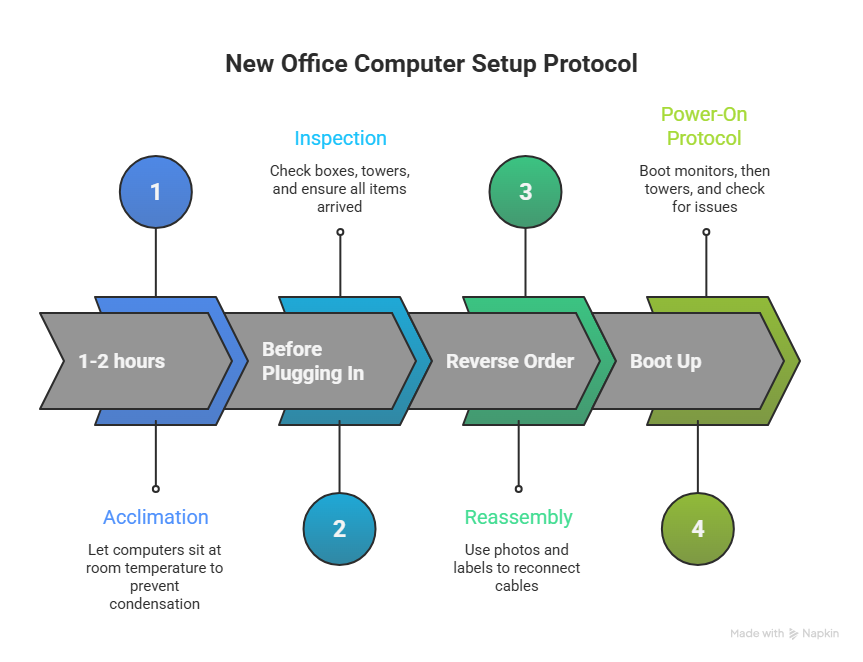
If computers were in a cold or hot truck, let them sit at room temperature for 1-2 hours before powering on. This prevents condensation from forming inside components and causing shorts .
Inspection
Before plugging anything in:
- Check boxes for damage
- Inspect towers for loose screws or bent ports
- Ensure everything you packed arrived
Reassembly
Use your “before” photos and labeled cables to reconnect everything in reverse order. This is where your labeling system pays off tenfold.
Power-On Protocol
- Boot up monitors first, then towers
- Listen for unusual noises
- Check that all drives are detected
- Run a quick backup check to ensure data integrity
- Test network connections
Common Mistakes That Damage Computers During Moves
After 15+ years of office IT relocation Ajax experience, here’s what I see go wrong:
Mistake 1: Packing computers in regular moving boxes with no padding. Boxes get stacked. Boxes get bumped. Without proper cushioning, your computer becomes a percussion instrument.
Mistake 2: Leaving cables attached. Ports can snap, cables can yank connectors loose. Always disconnect and label.
Mistake 3: Using newspaper for wrapping. Ink transfers, newspaper offers minimal protection, and it generates static .
Mistake 4: Forgetting to remove discs from drives. A bounced CD can shatter inside your drive.
Mistake 5: Transporting computers horizontally when they’re designed for vertical use. Component stress, cooling issues, and potential damage follow .
Mistake 6: No backup. I can’t stress this enough. If your data isn’t backed up, it doesn’t exist.
When to Call Professional Computer Movers in Ajax
Look, you can pack and move your office computers yourself. But should you?
Consider professional help if:
- You have 10+ workstations to move
- You have server equipment
- Your business can’t afford extended downtime
- You want insurance coverage for valuable equipment
- You’d rather focus on running your business than packing cables
Professional computer movers Ajax businesses trust—like our team at Ajax Movers—bring:
- Specialized packing materials for electronics
- Experience with office IT equipment layouts
- Insurance coverage for high-value items
- Efficient processes that minimize downtime
- Knowledge of local Ajax buildings and logistics
Your Office Computer Moving Checklist
Print this. Use it. Thank yourself later.
One week before:
- Back up all data (cloud + external drives)
- Document current setups with photos
- Order packing supplies (anti-static bubble wrap, boxes, labels)
- Label all cables and ports
Move day – morning:
- Shut down all computers properly
- Allow cooldown time
- Disconnect and bag cables using your labeling system
- Remove and pack internal components as planned
- Wrap towers in anti-static material
- Pack in boxes with 3+ inches of cushioning
- Label boxes “FRAGILE – ELECTRONICS”
Loading:
- Load computers last, unload first
- Secure boxes to prevent sliding
- Keep temperature-sensitive items in mind
Arrival:
- Allow 1-2 hours acclimation time
- Inspect all boxes for damage
- Unpack and reassemble using reference photos
- Power on cautiously and test everything
Let Ajax Movers Handle the Heavy Lifting
Here’s the truth: how to pack computers for moving is a question with many right answers. But the best answer might be letting professionals handle it.
At Ajax Movers, we’ve been relocating Ajax offices for over 15 years. We know that your computers aren’t just equipment—they’re your business’s heartbeat. Our office IT relocation Ajax services include:
- Careful handling of all computer equipment
- Professional packing with anti-static materials
- Labeling systems that make setup simple
- Insurance coverage for peace of mind
- Minimal downtime so you’re back to work faster
Don’t let computer packing stress overshadow your office move. Contact Ajax Movers today for a free quote on your office relocation. We’ll create a custom plan that keeps your business running while we handle the details.