Office Cabling & Setup After Relocation in Ajax | Complete IT Setup Guide
You made it. The trucks have unloaded. The furniture is (mostly) where it belongs. Your team is standing in the new space, coffee in hand, ready to work.
Then someone tries to log in.
And nothing connects.
If you’ve ever been through an office relocation, you know this moment well. The physical move is only half the battle. What comes next—office cabling and setup after relocation—determines whether your team is productive by lunch or frustrated until Friday.
I’ve spent over 15 years helping Ajax businesses relocate, and I can tell you with certainty: how you handle post-move IT setup makes or breaks the entire moving experience. This guide walks you through everything you need to know about office setup after moving in Ajax—from network cabling to workstation configuration—so your new office feels like home on day one.
And if the technical side feels overwhelming? That’s exactly why Ajax Movers offers complete office relocation support. We don’t just move your furniture—we help you get back to work .
Why Post-Move Office Cabling Matters More Than You Think
Let’s be honest. When most businesses plan a move, they focus on the big stuff: packing, trucks, timelines, and avoiding damage. The office network cabling Ajax professionals handle? It’s often an afterthought.
Here’s why that’s a problem:
- Every hour of downtime costs money. Lost productivity, missed client calls, delayed shipments—it adds up fast.
- Poor cabling creates safety hazards. Tangled cords, daisy-chained power strips, cables running across walkways.
- Bad setup now means rework later. Pulling cables after furniture is placed is expensive and disruptive.
- Network performance suffers. Poorly run cables mean slower speeds, dropped connections, and frustrated staff.
The goal isn’t just to get plugged in. The goal is to get set up right—so your team can work efficiently, safely, and without technical headaches .
Phase 1: Planning Your Office Cabling Before Move-In Day
Here’s a secret that corporate office wiring Ajax experts know: the best time to plan your cabling is before you move in.
Review Your New Space’s Existing Infrastructure
Not all Ajax office spaces are created equal. Before you start running cables:
- Check existing outlets and ports. How many data ports does the space already have? Where are they located?
- Identify the telecom room or server closet. Where does the outside connection enter? Is there space for your equipment?
- Note power outlet locations. Data cabling needs power nearby. Are outlets conveniently placed?
- Look for cable pathways. Are there raised floors, drop ceilings, or conduit runs you can use?
Map Your New Layout
Grab your floor plan. Sketch where every desk, printer, conference room, and shared device will go. Then:
- Mark each device that needs network connectivity
- Note power requirements for each area
- Identify high-traffic cable runs that need protection
- Plan for future growth—run extra cables now while it’s easy
Decide: Wired, Wireless, or Both?
Most modern offices use a hybrid approach:
- Wired connections for desktops, servers, printers, and video conference equipment (faster, more stable, more secure)
- Wireless for laptops, mobile devices, and guest access
- Both in conference rooms and common areas
Your office computer network setup plan should account for both from the beginning .
Phase 2: Structured Cabling Fundamentals
If you’re hiring professionals for structured cabling office Ajax work—and for most businesses, that’s the smart move—here’s what you need to understand.
What Is Structured Cabling?
Structured cabling means running all your network cables in an organized, standardized way. Instead of a spaghetti mess of wires everywhere, everything terminates in a central patch panel, neatly labeled and managed.
The benefits:
- Easier troubleshooting
- Simpler moves, adds, and changes
- Better airflow and cooling
- Professional appearance
- Compliance with building codes
Cable Categories Matter
For most Ajax businesses today:
- Cat6 is the minimum standard (supports gigabit speeds, future-proof for most needs)
- Cat6a if you’re running 10-gigabit now or have longer cable runs
- Fiber for backbone connections between floors or buildings
Skimping on cable quality to save a few dollars now means replacing everything sooner. Buy once, cry once .
The Path Cables Take
Professional office technology installation Ajax follows a few basic rules:
- Keep data cables at least 12 inches away from electrical lines (prevents interference)
- Never run cables parallel to fluorescent light fixtures
- Use cable trays, conduit, or J-hooks—never lay cables on ceiling tiles
- Leave service loops at both ends for future adjustments
Phase 3: Network Equipment Setup
With cabling in place, it’s time to connect the brains of your operation.
Server Room or Closet Organization
If your office has a server room or networking closet, how you organize it matters:
- Install a proper rack. Stacking equipment on shelves is risky. Get a real server rack.
- Use horizontal and vertical cable management. Those little plastic fingers with slots? Use them.
- Label everything. Every cable, every port, every device. Your future self will weep with gratitude.
- Plan for power. Use dedicated circuits, UPS battery backups, and never overload outlets.
- Consider cooling. Network equipment generates heat. Ensure adequate ventilation.
Switch and Patch Panel Setup
The typical setup:
- Cables from wall jacks run back to the server room
- They terminate on a patch panel (think of it as an organized switchboard)
- Short patch cables connect the patch panel to your network switch
- The switch connects to your router/firewall
- Router connects to your internet service provider’s equipment
This setup makes it easy to change which desk connects to which switch port—just move the patch cable, no rewiring required .
Wi-Fi Access Point Placement
Wireless is everyone’s favorite, but it needs thought:
- Don’t hide APs in server closets. Wi-Fi signals hate metal and concrete.
- Mount APs on ceilings in central locations
- Space them appropriately—too far apart creates dead zones, too close creates interference
- Consider user density—conference rooms need more capacity than storage areas
Phase 4: Workstation and Peripheral Setup
With infrastructure in place, it’s time for the finishing touches.
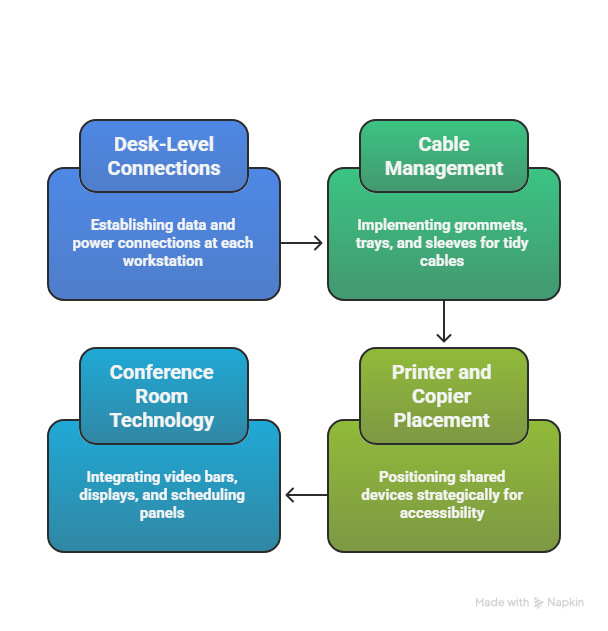
Desk-Level Connections
At each workstation, you’ll need:
- Data jack connected to your structured cabling
- Power outlets (ideally with surge protection)
- Cable management to keep desk areas tidy
For office electronics installation Ajax, consider using:
- Grommets in desk surfaces to route cables cleanly
- Under-desk cable trays to hide power strips and excess cabling
- Cable sleeves to bundle multiple cords together
Printer and Copier Placement
Shared devices need special attention:
- Place near where people actually work (not hidden in a far corner)
- Ensure network jacks are nearby
- Verify power capacity—large copiers may need dedicated circuits
- Leave clearance for paper loading and maintenance
Conference Room Technology
Modern meeting spaces are tech-heavy:
- Video bars or cameras need network connections and proper sightlines
- Wall-mounted displays need hidden cable runs through walls
- Room scheduling panels at the door need power and data
- Wireless presentation systems need network access
Plan these carefully before walls are closed up .
Phase 5: Testing and Validation
Nothing is “working” until you prove it works.
Cable Testing
Professional IT network setup Ajax includes:
- Continuity testing: Every pair of wires connects correctly
- Fluke testing: Verifies the cable supports intended speeds
- Length verification: Ensures cables aren’t too long for signal strength
Network Testing
Once everything connects:
- Speed tests at multiple points—wired and wireless
- Coverage mapping for Wi-Fi (walk the space, check signal strength everywhere)
- Device connectivity—can printers see servers? Can laptops see printers?
- Internet failover testing if you have backup connections
User Acceptance Testing
Before declaring victory:
- Have someone from each department log in and work for 15 minutes
- Test department-specific equipment (POS systems, medical devices, design workstations)
- Verify phone systems work (if applicable)
- Check that guest Wi-Fi works without accessing internal networks
Phase 6: Common Post-Move IT Problems and How to Avoid Them
After moving hundreds of Ajax offices, here’s what typically goes wrong—and how to prevent it.
Problem: Cable Spaghetti Under Desks
Solution: Install cable management before desks are populated. Once chairs roll in and people start working, no one wants to crawl under desks to organize.
Problem: Not Enough Outlets
Solution: During planning, count twice. Add 20% for future growth. Consider desktop power modules that sit on surfaces.
Problem: Wi-Fi Dead Zones
Solution: Do a professional site survey. Consumer-grade routers in back closets don’t cut it for business.
Problem: Labeling Failures
Solution: Label at both ends. Use a label maker, not masking tape and sharpie. Keep a diagram.
Problem: Forgetting Building Codes
Solution: Work with professionals. Plenum-rated cable in air handling spaces isn’t optional—it’s fire safety law .
Professional Setup vs. DIY: What Makes Sense for Your Ajax Business?
Some businesses handle office relocation setup guide tasks themselves. Others call professionals. Here’s how to decide.
Consider DIY If:
- You have 5 or fewer workstations
- Someone on your team is IT-proficient
- The new space is similar to the old layout
- You have flexibility on timeline
- You enjoy cable management (some people do!)
Consider Professional Help If:
- You have 10+ workstations
- You have server equipment
- You need minimal downtime
- The new layout is significantly different
- You want warranties and insurance coverage
- You’d rather focus on your actual business
Professional office setup Ajax services—like those Ajax Movers coordinates with trusted partners—bring expertise, proper tools, testing equipment, and efficiency that DIY can’t match .
Your Post-Move Office Setup Checklist
Use this to track progress:
Before Move Day:
- Survey new space for existing infrastructure
- Create detailed floor plan with all devices marked
- Order necessary cabling, jacks, and equipment
- Schedule professional installers if needed
- Coordinate with internet provider for service transfer
Move-In Day:
- Verify cabling infrastructure is ready
- Set up server room/network closet first
- Connect critical systems (internet, phones, servers)
- Begin workstation connections in priority order
Week One:
- Complete all workstation connections
- Test every device
- Document final configuration with photos
- Gather feedback from team on any issues
- Schedule follow-up for adjustments
How Ajax Movers Supports Your Complete Office Relocation
Here’s what many businesses don’t realize: the best office moving companies think beyond the truck.
At Ajax Movers, we’ve spent 15+ years helping Ajax businesses relocate. We’ve seen the good, the bad, and the “why is that cable running through the ceiling tile?” We know that office cabling after relocation is where the real work begins.
That’s why our office moving services include:
- Coordination with IT vendors and cabling professionals
- Detailed pre-move planning that accounts for technical needs
- Furniture placement that leaves access for cabling work
- Post-move support to ensure you’re fully operational
- Connections to trusted technology partners we’ve vetted over years
You don’t just need movers. You need a partner who understands that your business runs on connectivity .
Ready for a Smooth Office Relocation in Ajax?
Don’t let office cabling and setup after relocation become the bottleneck that keeps your team from working. Whether you’re moving across the street or across the city, proper planning and professional execution make all the difference.
Ajax Movers is here to help. From the first walkthrough to the final cable connection, we’ll make sure your new office is ready for business on day one.
👉 Get Your Free Office Moving Quote Today